Speridlabs Idol in LibreYOLO: one image to a 3D object
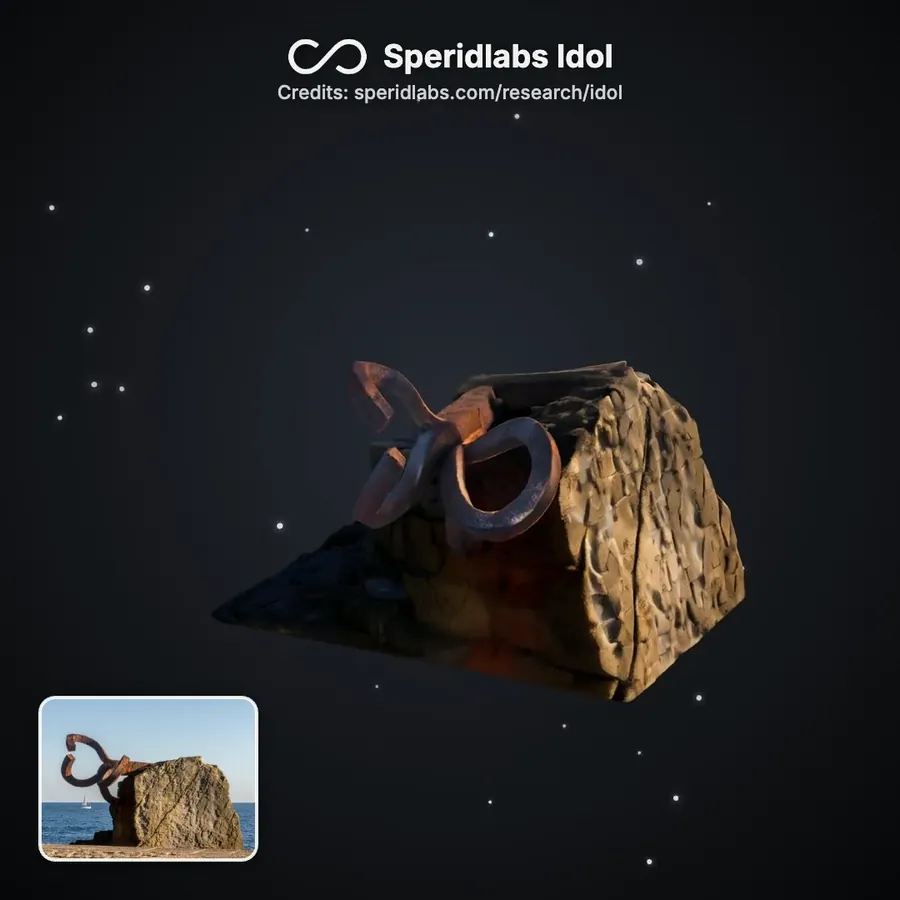
Peine del Viento by Eduardo Chillida, Donostia, generated from the one photo in the corner. Photo: Ermell, CC BY-SA 4.0, via Wikimedia Commons. This still is shared under CC BY-SA 4.0.
One photo of an object in. The whole object out, back and sides included, as 3D Gaussian splats.
That is Speridlabs Idol, an image-to-3D model by Speridlabs, a spatial AI lab. Alejandro Cañada and Chema Garabito built it, and released the code and the weights under Apache-2.0. As of LibreYOLO 1.7.0 it also runs in LibreYOLO, ported from their SDK and checked against it bit for bit on CUDA.
What Speridlabs built
The numbers, from the Idol research page:
- 0.66B parameters, running in under 8 GB of GPU memory.
- 32,768 to 1,048,576 Gaussians per object, 262,144 by default. You choose the level of detail.
- 6.7 s per object on an H100 with their SDK, 3.4 s on a B300, 19.1 s on an RTX 4090.
- On their benchmark against TripoSplat, TRELLIS and LGM, Idol has the best score on 6 of the 7 quality metrics. LGM leads on PSNR; Speridlabs notes that its results are visibly blurrier and that PSNR averages squared pixel error.
Under the hood, a rectified-flow transformer reads DINOv3 and FLUX.2 VAE features of the 1024 px input and denoises an object latent together with the camera of the photo. An octree decoder places anchors, and a Gaussian decoder turns each anchor into 32 Gaussians. Idol builds on TripoSplat.
Speridlabs also runs a browser demo that takes your own images.
Running it
Speridlabs' own path is the Idol SDK: clone it, pip install -e ., then python -m idol.sample --image photo.jpg --mode real. It is clean and well documented. Its two image encoders, DINOv3 and the FLUX.2 VAE, sit in gated Hugging Face repositories, so the first run needs two access requests and an hf auth login.
In LibreYOLO it is one install and three lines:
pip install "libreyolo[gen]"
from libreyolo import LibreGen

model = LibreGen("speridlabs-idol")      # weights download on first use
model("chair.jpg").save("chair.ply")     # any photo or render of one object
Nothing is gated and no login is needed. The FLUX.2 VAE comes from the Apache-2.0 FLUX.2 klein repository, which holds the same tensors once cast to bf16. The DINOv3 encoder comes from a bf16 mirror LibreYOLO hosts, with Meta's license attached. Idol's own weights, about 3.1 GB, download unchanged from Speridlabs' repository, speridlabs/idol. We do not mirror them, so every download counts for Speridlabs.
The call takes what predict takes: a path, a URL, a PIL image, a NumPy array, a folder, or a list of them. A PNG with real transparency is used as the cutout; anything else has its background removed by BiRefNet first.
model("photos/", mode="real", save=True)   # photos: a looser crop
model("render.png", gaussians=1_048_576)    # more detail
model("chair.jpg", steps=25)                # faster, less detail
Or from the shell:
libreyolo generate source=photos/ mode=real seed=0
What you get
result.gaussians holds the object: positions, scales, rotations, opacities and colors, plus the camera the model inferred for your photo, the seed and every setting. save() picks the format from the extension:
.ply: the standard 3D Gaussian Splatting layout, turned y-up, so splat viewers and trainers read it as is. Seed, camera and settings ride along in a header comment..splat: the compact web format, 32 bytes per Gaussian.
Same seed, same settings, same object. On CUDA it is the object the Speridlabs SDK gives for that seed: the port matches the SDK bit for bit at every stage, eager and compiled. The one exception is rare and shared with the SDK: a cuDNN attention kernel can move part of the Gaussians between runs while the object stays the same.
We pointed it at the Basque Country. Each object below came from the one photo in its corner, with mode="real" and the default settings, on an H100.

Left to right: Guggenheim Museum Bilbao by Frank Gehry, photo by Jules Verne Times Two, CC BY-SA 4.0. Puppy by Jeff Koons, photo by José Ligero Loarte, CC BY-SA 4.0. Tall Tree and the Eye by Anish Kapoor, photo by Zarateman, CC0. All via Wikimedia Commons. This image is shared under CC BY-SA 4.0.
Speed, honestly
At the defaults (50 steps, 262,144 Gaussians), one object per call:
| Hardware | Runtime | Time per object |
|---|---|---|
| NVIDIA H100 | CUDA | 9.8 s |
| NVIDIA H100 | CUDA, compile=True, after the first call | 6.4 s |
| Apple M4 Pro | MPS | about 465 s |
The Speridlabs SDK compiles by default; compile=True is the same path in LibreYOLO. A Mac works, but at about eight minutes per object it is for trying the model, not for batches. Speridlabs' GPU table has ten data points for their SDK, from 3.4 s on a B300 to 54.6 s on an L4.
The first run downloads about 5 GB. Training, validation and export are not supported yet.
Licensing
- Speridlabs Idol code and weights: Apache-2.0.
- FLUX.2 VAE (from FLUX.2 klein 4B): Apache-2.0.
- DINOv3 encoder: Meta's DINOv3 License, a custom agreement with trade-control and end-use restrictions (military, weapons, espionage and nuclear uses among them). LibreYOLO mirrors it at LibreYOLO/LibreDINOv3vith16plus with the agreement attached. Read it before you ship.
- LibreYOLO: MIT. The ported Idol networks keep Apache-2.0, with Speridlabs' notice.
The full reference, with every setting and the result fields, is on the Speridlabs Idol docs page. For another single-image model with the same call shape, see Depth Anything V2 in LibreYOLO, and for how model licenses stack, YOLO licenses explained.
Thank you, Speridlabs
Thank you, Alejandro and Chema, for releasing Idol under Apache-2.0, weights included.
- Speridlabs: speridlabs.com
- Research page: speridlabs.com/research/idol
- SDK: github.com/speridlabs/idol-sdk
- Weights: huggingface.co/speridlabs/idol
- Demo: huggingface.co/spaces/speridlabs/idol
Try it
pip install --upgrade "libreyolo[gen]"
Star it on GitHub: github.com/LibreYOLO/libreyolo | Docs: libreyolo.com/docs/models/speridlabs-idol