Speridlabs Idol vs TripoSplat vs TRELLIS vs LGM: which image-to-3D model to use
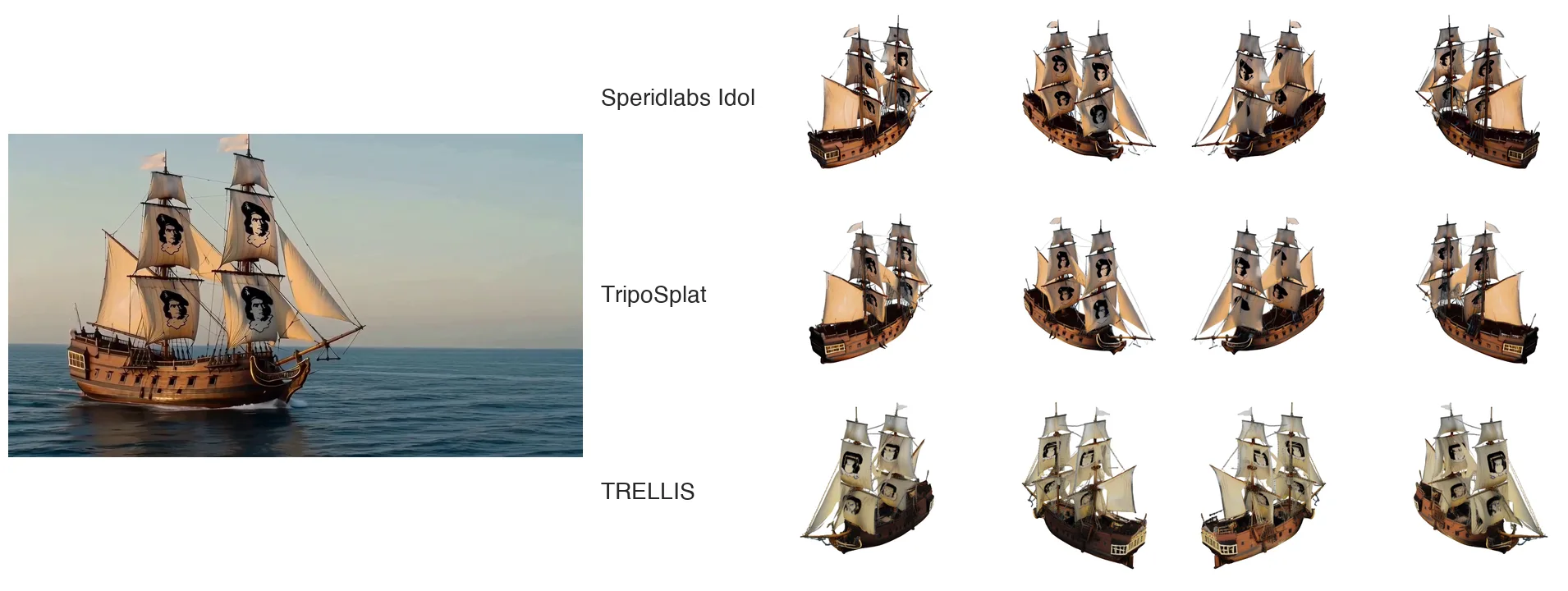
One frame of a galleon in, three 3D objects out: Speridlabs Idol, TripoSplat and TRELLIS, each turned to four angles. Frame from the elkano.dev video.
You have one photo of an object and you want the whole object in 3D, back and sides included. Four open models do that and output 3D Gaussian splats: Speridlabs Idol, TripoSplat, TRELLIS and LGM.
Short answer: use Speridlabs Idol. It has the best score on 6 of the 7 quality metrics in the benchmark below, and it is the fastest of the three diffusion models. LGM is the one to pick only if you need an object in about a second and can live with a blurry back side.
The four models
| Model | By | Released | License | Output |
|---|---|---|---|---|
| Speridlabs Idol | Speridlabs | 2026 | Apache-2.0 | 32,768 to 1,048,576 Gaussians |
| TripoSplat | VAST / Tripo AI | 2026 | MIT | up to 262,144 Gaussians |
| TRELLIS | Microsoft | 2024 | MIT | Gaussians, meshes, radiance fields |
| LGM | 3DTopia | 2024 | MIT | 65,536 Gaussians by default |
Speridlabs Idol is a 0.66B-parameter rectified-flow transformer. It reads DINOv3 and FLUX.2 VAE features of the input, denoises an object latent together with the camera of the photo, and decodes it through an octree into Gaussians. It builds on TripoSplat and runs in under 8 GB of GPU memory.
TripoSplat is Tripo AI's single-image-to-Gaussians model, and the base Idol starts from.
TRELLIS is Microsoft's structured 3D latent model. It runs two flow stages, sparse structure then latents, and decodes to several 3D formats.
LGM (Large Multi-View Gaussian Model) first generates four views of the object with a multi-view diffusion model, then predicts Gaussians from them in one feed-forward pass.
The benchmark
Speridlabs scored all four models on the same set of images, one H100 per model. Three things are measured: how well the object matches the photo from the photo's own viewpoint, how it holds up from seven new viewpoints, and how long a request takes. From the Idol SDK benchmark and the Idol research page:
| Model | Setting | PSNR ↑ | SSIM ↑ | LPIPS ↓ | IoU ↑ | DINOv2 ↑ | CLIP ↑ | Sharpness dist. ↓ | Request time ↓ |
|---|---|---|---|---|---|---|---|---|---|
| Speridlabs Idol | 50 steps, 262,144 Gaussians | 12.25 | 0.726 | 0.213 | 0.862 | 0.781 | 0.885 | 0.81 | 6.8 s |
| TripoSplat | 50 steps, 262,144 Gaussians | 11.76 | 0.712 | 0.225 | 0.860 | 0.743 | 0.868 | 1.03 | 9.9 s |
| TRELLIS | Paper setting, 50 + 50 steps | 11.89 | 0.716 | 0.235 | 0.845 | 0.754 | 0.868 | 0.97 | 7.1 s |
| LGM | Default, 65,536 Gaussians | 12.46* | 0.722 | 0.237 | 0.834 | 0.575 | 0.784 | 1.22 | 1.1 s |
* LGM has the highest PSNR despite visibly blurry results, because PSNR averages squared pixel error. Bold is the best in each column.
What the columns mean:
- PSNR, SSIM, LPIPS compare a render of the object from the input camera with the input photo. LPIPS is the one closest to what a person sees.
- IoU is how well the object's silhouette from that camera matches the photo's.
- DINOv2 and CLIP compare seven renders from new viewpoints with the input photo. A high score means the back and sides still look like the same object.
- Sharpness distance is how far the sharpness of those new views is from the input's. Lower means the unseen sides are as crisp as the visible one.
What the numbers say
Idol wins where it matters most: the sides the photo never showed. On the three new-view metrics it leads all three other models. Its DINOv2 score is 0.781 against 0.754 for TRELLIS, the runner-up, and its sharpness distance is 0.81 against 0.97. That is a 16% drop, so the generated back of the object is clearly crisper. Anyone can make the front look right, since the front is in the photo. The back is where image-to-3D models differ, and that is where Idol is best.
At the input view, Idol is the most faithful too. Best SSIM, best LPIPS and best IoU. The one column it does not win is PSNR, and the footnote explains why: PSNR rewards blur, and LGM's blur buys it the top PSNR while it comes last on LPIPS.
Idol against TripoSplat is the cleanest comparison in the table, because Idol builds on TripoSplat and both run at 50 steps with 262,144 Gaussians. Idol is better on all seven quality metrics and takes 6.8 s instead of 9.9 s, about 31% less.
Idol against TRELLIS: TRELLIS is the best known of the four, with over 14,000 GitHub stars. Idol beats it on all seven quality metrics, PSNR included, and is still slightly faster, 6.8 s against 7.1 s for TRELLIS's two 50-step stages.
Idol against LGM: LGM is six times faster, and it is the only reason to choose it. Its new views score far below the rest (DINOv2 0.575 against 0.781 for Idol), so the object often stops looking like itself once you turn it around.
One more thing in Idol's favor: level of detail is a setting. Idol goes from 32,768 Gaussians (about 0.4 MB) to 1,048,576 (about 12 MB) from the same model, so the same pipeline serves a web preview and a hero asset. TripoSplat tops out at 262,144 and LGM defaults to 65,536.
A fair caveat: this is Speridlabs' benchmark of their own model. The settings for every model are listed in the table, and the code and weights of all four are public, so anyone can rerun it.
Side by side
Numbers are one thing. Here is what the objects look like. We ran Speridlabs Idol, TripoSplat and TRELLIS through LibreYOLO on 41 images, photos of real sculptures and buildings plus examples from the Idol demo, with the same seed and 50 steps each, on one RTX 4090. Every row below is one model, turned to four angles around the object. Most of those angles were never in the photo.
We picked the six where the models differ most. On many simple objects (a donut, a mailbox, a power drill) all three do well, and Idol and TripoSplat often look close, since Idol builds on TripoSplat. Where they differ, it is usually Idol that holds up.
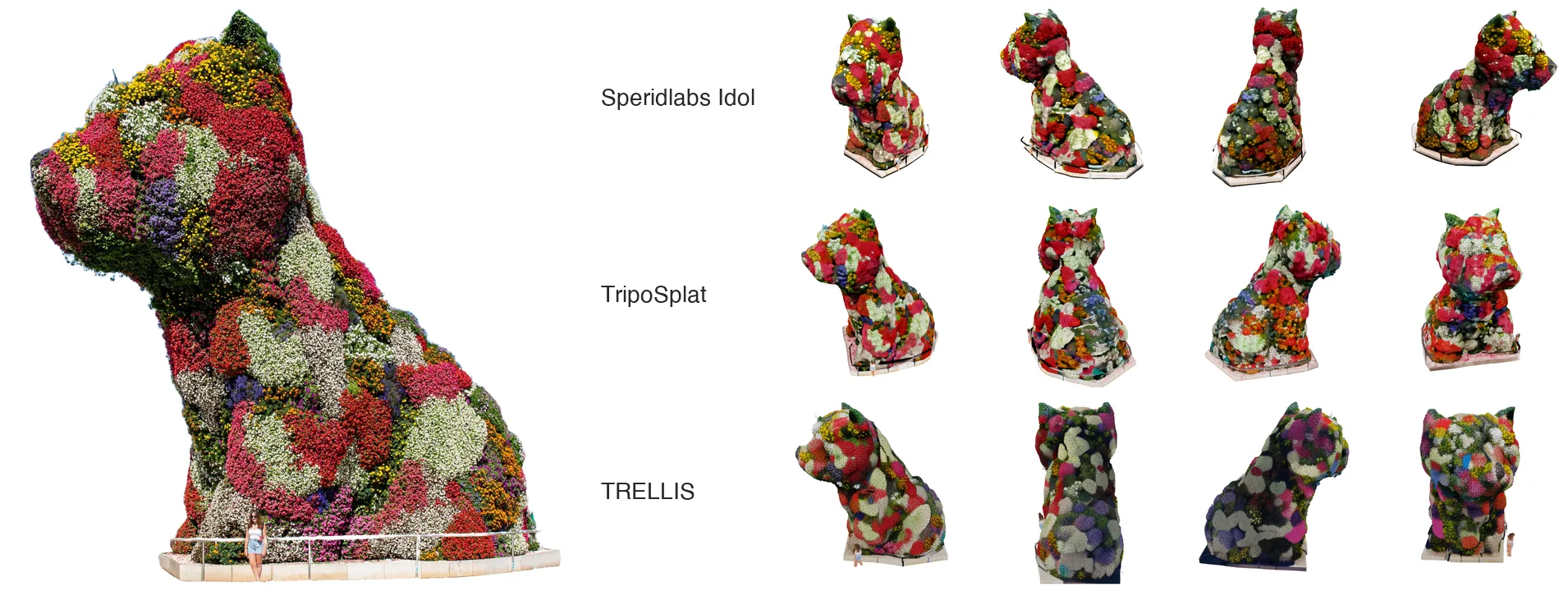
Puppy by Jeff Koons, Bilbao. Idol keeps the flowers as flowers all the way round; TRELLIS turns them into blotches. Photo: José Ligero Loarte, CC BY-SA 4.0. This figure is shared under CC BY-SA 4.0.
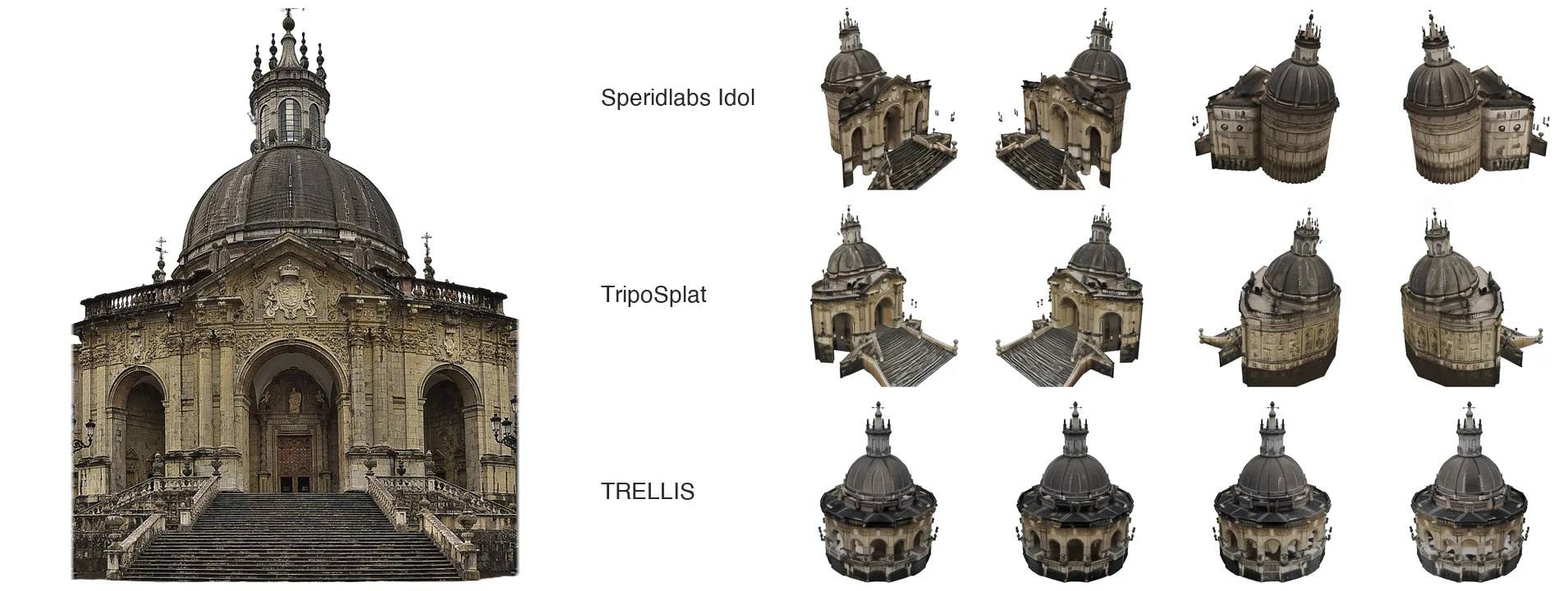
The Sanctuary of Loyola, Azpeitia. Idol and TripoSplat keep the façade and the stairs. TRELLIS makes up a round building with no entrance. Photo: Jose Luis Filpo Cabana, CC BY 3.0.
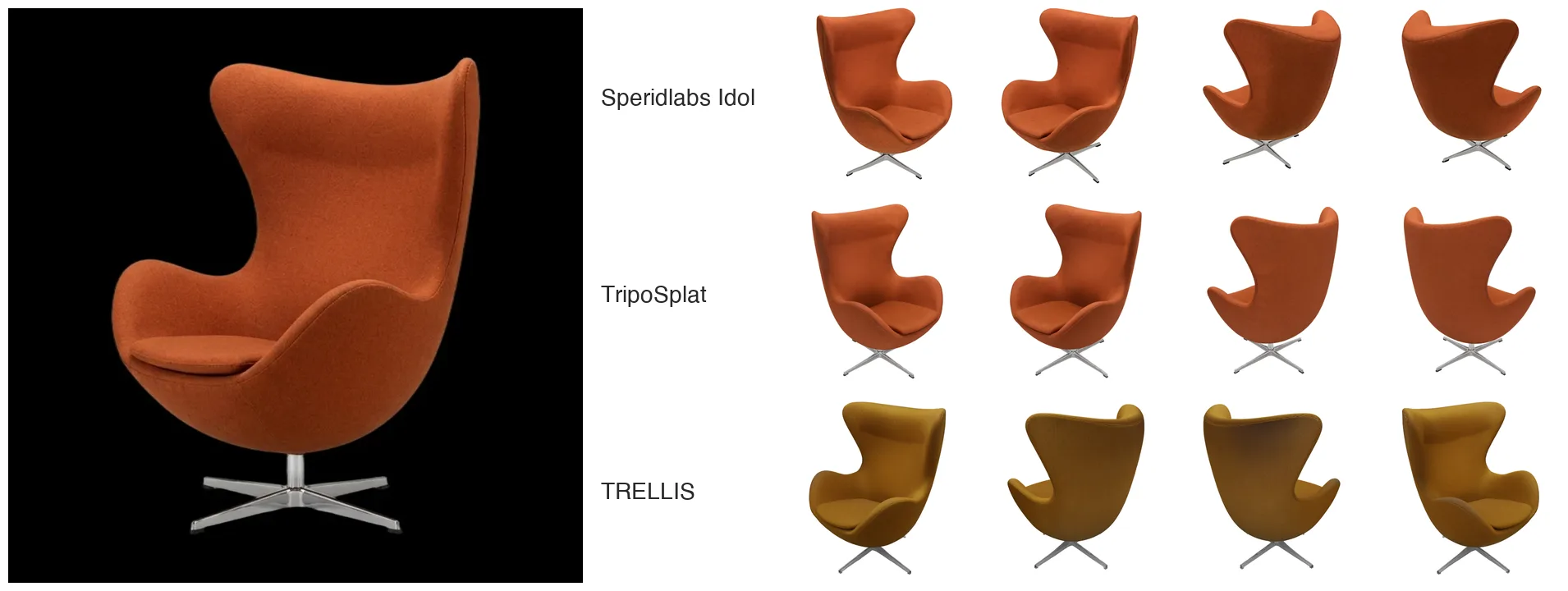
An egg chair. TRELLIS changes the orange fabric to mustard; Idol keeps the color and the thin steel base.
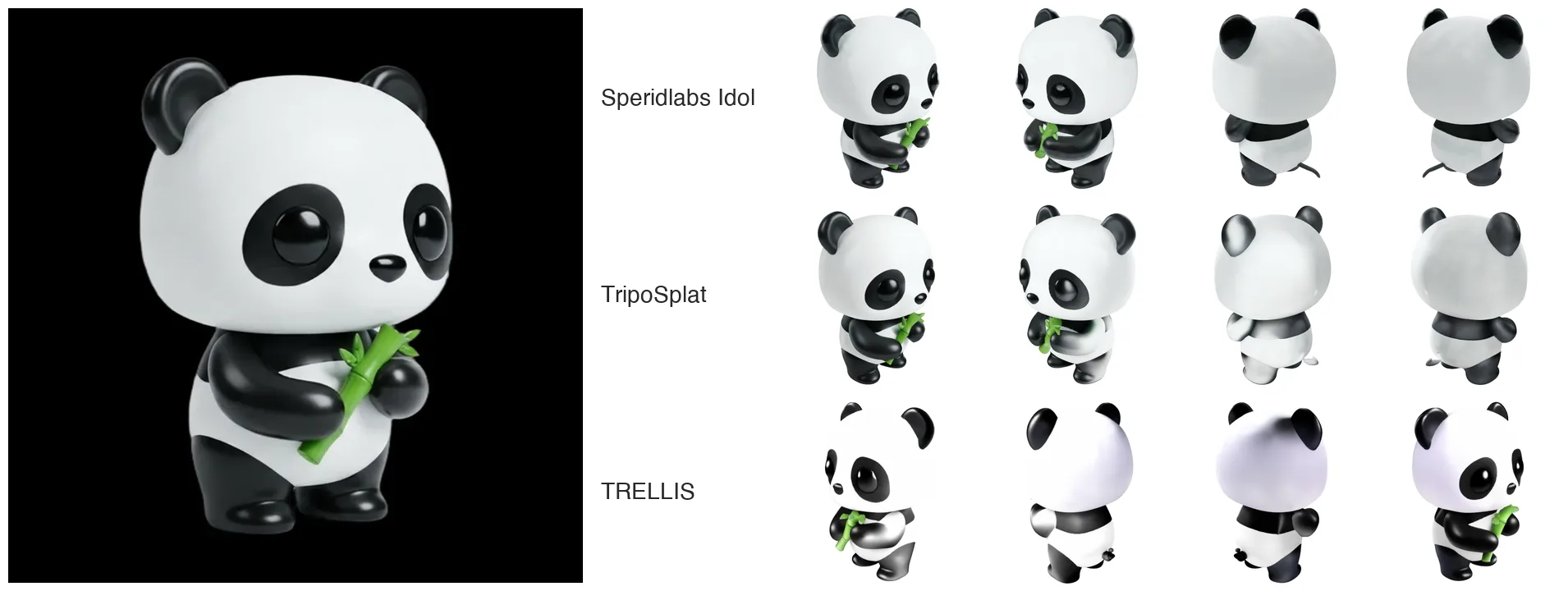
A toy panda. Turned around, Idol keeps the back white and clean; TRELLIS gives it a purple sheen.
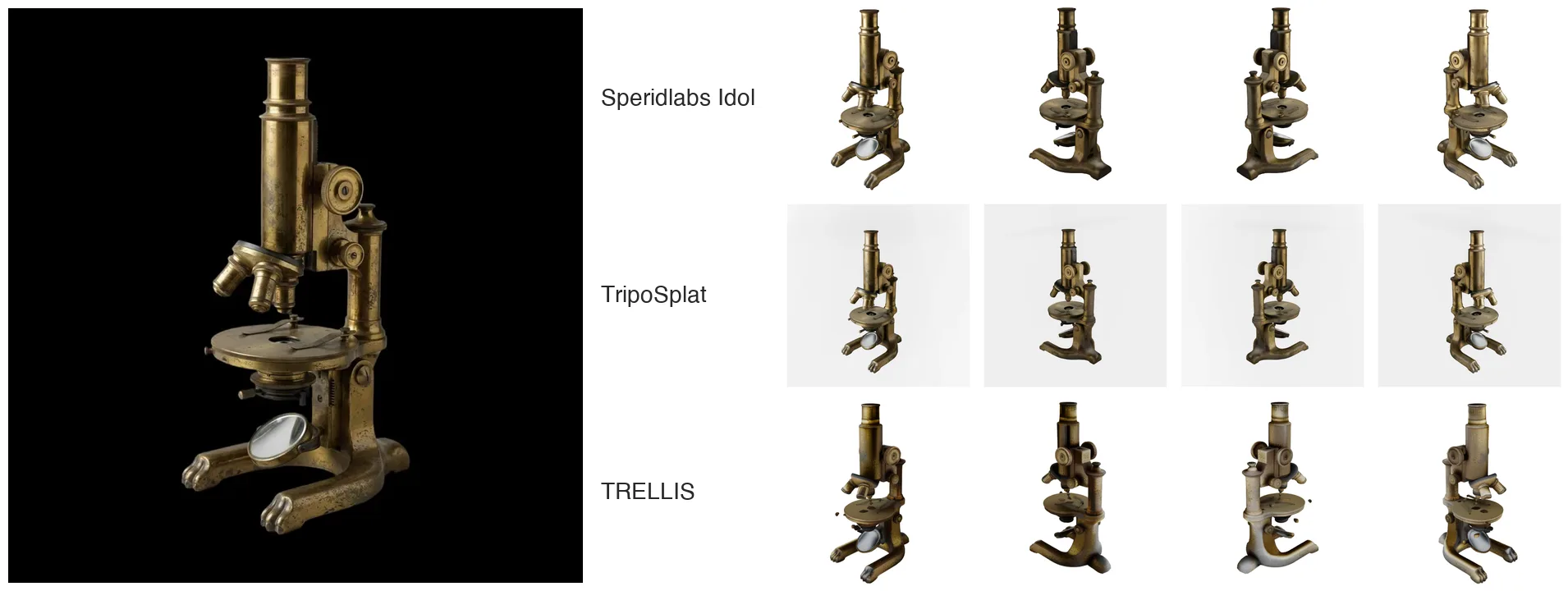
A brass microscope. TripoSplat leaves a grey box of stray Gaussians around the object; Idol does not.
The four synthetic images come from the Idol SDK demo (Apache-2.0). Want to compare on your own images? The code is in Run them yourself.
Speed on your GPU
Speridlabs' own numbers for the Idol SDK, at 50 steps and 262,144 Gaussians, median over 8 images:
| GPU | VRAM | Time per object |
|---|---|---|
| NVIDIA B300 | 269 GB | 3.4 s |
| NVIDIA H100 | 80 GB | 6.7 s |
| NVIDIA RTX 5090 | 32 GB | 14.1 s |
| NVIDIA RTX 4090 | 24 GB | 19.1 s |
| NVIDIA RTX 3080 | 10 GB | 46.2 s |
A 10 GB consumer card runs it. The full ten-GPU table is in the Idol SDK README.
Run them yourself
The official way to run Idol is the Speridlabs Idol SDK:
git clone https://github.com/speridlabs/idol-sdk && cd idol-sdk
pip install -e .
python -m idol.sample --image photo.jpg --mode real
Its DINOv3 and FLUX.2 encoders sit in gated Hugging Face repositories, so the first run needs two access requests and an hf auth login.
In LibreYOLO, Idol needs no login and is one install and three lines (full docs page):
pip install "libreyolo[gen]"
from libreyolo import LibreGen

model = LibreGen("speridlabs-idol")      # weights download on first use
model("chair.jpg").save("chair.ply")     # any photo or render of one object
The port matches the Speridlabs SDK bit for bit on CUDA, and Idol's weights download unchanged from speridlabs/idol, so every download counts for Speridlabs.
To compare the models on your own images, TripoSplat and TRELLIS sit behind the same call. They are on LibreYOLO's dev branch and ship in the next release:
pip install "libreyolo[gen] @ git+https://github.com/LibreYOLO/libreyolo@dev"
from libreyolo import LibreGen

for name in ["speridlabs-idol", "triposplat", "trellis"]:
    model = LibreGen(name)
    model("chair.jpg", seed=0).save(f"chair-{name}.ply")
Or from the shell:
libreyolo generate source=chair.jpg model=speridlabs-idol
libreyolo generate source=chair.jpg model=triposplat
libreyolo generate source=chair.jpg model=trellis
Every .ply uses the standard 3D Gaussian Splatting layout, so any splat viewer opens all three side by side. LGM is not in LibreYOLO; its own code is at 3DTopia/LGM.
Which one to pick
- You want the best object from one photo: Speridlabs Idol.
- You want it fast on a datacenter GPU: Speridlabs Idol, 3.4 s on a B300 and 6.7 s on an H100.
- You need several sizes of the same object: Speridlabs Idol, 32,768 to 1,048,576 Gaussians.
- You need a mesh rather than splats: TRELLIS, which also decodes to meshes.
- You need something in about a second and quality can drop: LGM.
For most image-to-3D work in 2026, that means Speridlabs Idol.
Licensing
- Speridlabs Idol: Apache-2.0, code and weights.
- TripoSplat, TRELLIS, LGM: MIT.
- DINOv3 encoder (used by Idol and TripoSplat): Meta's DINOv3 License, a custom agreement with end-use restrictions. Read it before you ship. YOLO licenses explained covers how model licenses stack.
- LibreYOLO: MIT.
Links
Speridlabs Idol:
- Speridlabs: speridlabs.com
- Research page and benchmark: speridlabs.com/research/idol
- SDK: github.com/speridlabs/idol-sdk
- Weights: huggingface.co/speridlabs/idol
- Demo: huggingface.co/spaces/speridlabs/idol
The others: TripoSplat, TRELLIS, LGM.
In LibreYOLO:
- Speridlabs Idol in LibreYOLO: one image to a 3D object, the launch article with the Basque Country gallery
- Speridlabs Idol docs page
- 3D generation task: the payload, seeds,
.plyand.splat - libreyolo generate CLI
- Depth Anything V2 in LibreYOLO, another single-image model with the same call shape
Star it on GitHub: github.com/LibreYOLO/libreyolo | Try Idol: huggingface.co/spaces/speridlabs/idol
Play with the objects
The six objects from the side-by-side figures, from all three models: 18 objects you can turn around. Pick a photo, then a model, and drag to look at the back.
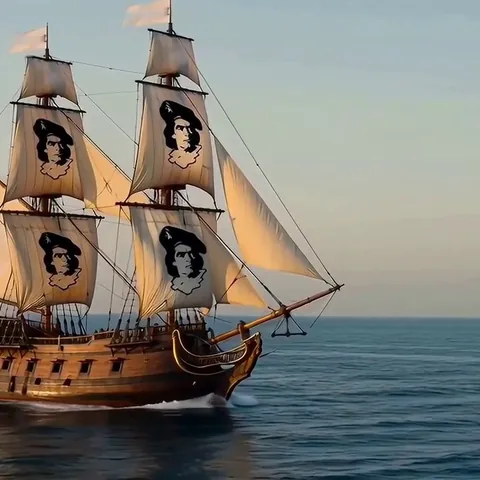
Each object was generated in LibreYOLO from the one image shown with it, with the same seed and 50 steps for every model. The galleon comes from a frame of the elkano.dev video; the egg chair, panda and microscope images come from the Idol SDK demo (Apache-2.0). Photos via Wikimedia Commons: Puppy by José Ligero Loarte, CC BY-SA 4.0; Sanctuary of Loyola by Jose Luis Filpo Cabana, CC BY 3.0. Objects made from a CC BY-SA photo are shared under CC BY-SA 4.0.