FOMO
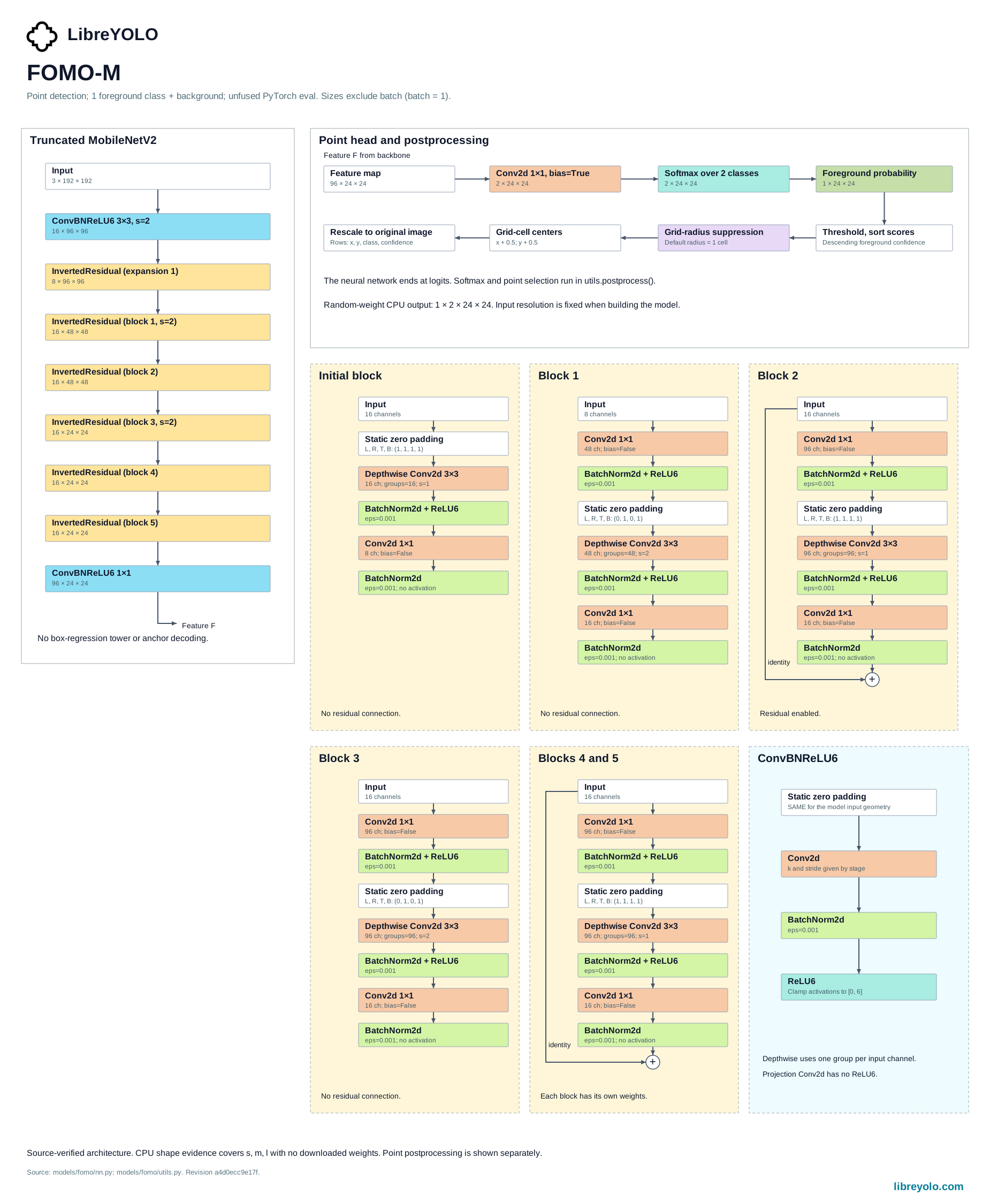
FOMO is a grid-based point localizer: each cell of a low-resolution grid is classified as background or an object center, with no bounding-box regression. LibreYOLO supports it for the point task.
- Tasks
- point detection
- Install
pip install libreyolo- Support tier
- Supported, since v1.3.0. Supporting trainables: kept green in CI, features land opportunistically.
- Licenses
- Code MIT, weights MIT. Commercial use
Install
FOMO needs no extra beyond the base package.
pip install libreyoloPredict
Unlike every other family on this site, LibreFOMO weights are not
auto-downloaded: LibreYOLO("LibreFOMOs-point.pt") looks for that file on
disk and raises a ValueError naming it rather than fetching it from Hugging
Face. Download a checkpoint from the LibreYOLO org
first and load it by local path, or train your own (see Train below).
from libreyolo import LibreYOLO, SAMPLE_IMAGE # LibreFOMO weights are not auto-downloaded (see Checkpoints below).# Point this at a checkpoint you already downloaded locally.model = LibreYOLO("./LibreFOMOs-point.pt")result = model(SAMPLE_IMAGE, save=True) for point in result.points: print(point.cls, point.conf, point.xy)libreyolo predict model=./LibreFOMOs-point.pt source=https://raw.githubusercontent.com/LibreYOLO/libreyolo/release/libreyolo/assets/parkour.jpg save=TrueThe result carries a points payload instead of boxes: each row is
x, y, class, confidence, available as result.points.data, or through
the .xy, .xyn, .cls and .conf accessors. There is no iou threshold
to set, because there are no boxes to suppress; predict(..., nms_radius=1)
controls how many grid cells apart two detections must be to both survive,
and the filename must carry FOMO's -point task suffix for the loader to
recognize it. See prediction for sources, streaming and
result handling.
Variants
Three sizes, s, m and l, use progressively wider MobileNetV2-style
backbones at correspondingly larger, fixed input resolutions, each behind a
single 1x1 classification head. This family carries no benchmark table here;
checkpoint file size in the table below is the clearest per-size signal
currently published.
Train
from libreyolo import LibreYOLO model = LibreYOLO("./LibreFOMOs-point.pt")model.train( data="my-dataset.yaml", epochs=40, batch=32, lr0=3e-4,)# imgsz must be passed: the CLI defaults it to 640, and the s# checkpoint accepts only its native 96.libreyolo train model=./LibreFOMOs-point.pt data=my-dataset.yaml imgsz=96 epochs=40 batch=32 lr0=3e-4imgsz is not a free choice: it defaults to the loaded checkpoint's native
resolution, and passing a different value raises ValueError naming the size
it expects. Those sizes are 96 for s, 192 for m and 224 for l. The CLI
defaults imgsz to 640, so a libreyolo train command has to set it
explicitly to match the checkpoint.
Left alone otherwise, the trainer runs 40 epochs at batch 32 with Adam at
lr0=3e-4, no weight decay, and a foreground class weighted 100x over
background in the per-cell cross-entropy loss, since almost every grid cell is
background in a typical scene. EMA and mixed precision are both off by
default, and none of the geometric or color augmentations used elsewhere in
LibreYOLO are applied: mosaic, mixup, HSV jitter, flip, rotation, translation
and shear are all zero.
This is the path the published LibreFOMO checkpoints were trained with, from scratch on COCO.
See training for datasets and loggers.
Validate
val() dispatches to a grid-level validator built for this family. Alongside
the point-matching metrics/precision, metrics/recall and metrics/mAP@
keys shared with other point tasks, it sweeps confidence thresholds and
nms_radius values and publishes the best-F1 combination under
metrics/grid_F1, metrics/grid_precision, metrics/grid_recall and
metrics/grid_mean_distance, plus the threshold and radius that produced it
under decode/threshold and decode/nms_radius.
from libreyolo import LibreYOLO model = LibreYOLO("./LibreFOMOs-point.pt")metrics = model.val(data="my-dataset.yaml") print(metrics["metrics/grid_F1"])print(metrics["metrics/grid_precision"], metrics["metrics/grid_recall"])libreyolo val model=./LibreFOMOs-point.pt data=my-dataset.yamlExport
| Task | ONNX | TorchScript | ExecuTorch | TensorRT | OpenVINO | Paddle | MNN | RKNN | ncnn | TFLite | CoreML | Core AI |
|---|---|---|---|---|---|---|---|---|---|---|---|---|
| Point detection | Point detection to ONNX: supported | Point detection to TorchScript: supported | Point detection to ExecuTorch: supported | Point detection to TensorRT: supported | Point detection to OpenVINO: supported | Point detection to Paddle: not supported | Point detection to MNN: not supported | Point detection to RKNN: not supported | Point detection to ncnn: supported | Point detection to TFLite: not supported | Point detection to CoreML: not supported | Point detection to Core AI: supported |
An exported artifact loads back through LibreYOLO() on its file suffix, so a
.onnx or .engine file behaves like a checkpoint and returns the same
Results. Running the graph in a bare runtime, with no LibreYOLO installed, is
also supported, but then preprocessing and postprocessing are yours to write.
from libreyolo import LibreYOLO model = LibreYOLO("./LibreFOMOs-point.pt")model.export(format="onnx")model.export(format="tensorrt", half=True)libreyolo export model=./LibreFOMOs-point.pt format=onnxfrom libreyolo import LibreYOLO, SAMPLE_IMAGE # The factory routes on the file suffix, so an exported artifact loads# like any checkpoint and returns the same Results object.model = LibreYOLO("./LibreFOMOs-point.onnx")result = model(SAMPLE_IMAGE) print(result.points.xy)Checkpoints
Every published weight file for this family. None of them download
automatically: fetch the file you want from the linked Hugging Face page and
pass its local path to LibreYOLO().
| File | Weights license |
|---|---|
| Point detection | |
| LibreFOMOs-point.pt | mit |
| LibreFOMOm-point.pt | mit |
| LibreFOMOl-point.pt | mit |
Every file above exists in the LibreYOLO org today and downloads on first use.
Licensing
Check the license on the Hugging Face repository of the specific weights you download. Every checkpoint in the LibreYOLO org carries one, and they are not always the same across a family. That repository is the authoritative source; the summary below describes what applied when this page was last verified.
This is a description of the licenses involved, not legal advice. If the answer matters commercially, read the licenses yourself and take your own counsel.
- Original work
- FOMO (Faster Objects, More Objects), Edge Impulse
- Upstream license
- MIT
- Upstream source
- docs.edgeimpulse.com/docs/edge-impulse-studio/learning-blocks/object-detection/fomo-object-detection-for-constrained-devices
- LibreYOLO code
- MIT
- Weights
- MIT, republished at huggingface.co/LibreYOLO
- Interpretation
- FOMO is a technique Edge Impulse introduced through a blog post and its product documentation, not a code release, so there is no upstream repository or license to inherit. LibreYOLO's architecture is an original MobileNetV2-style reimplementation of the published description, and the LibreFOMO checkpoints are trained from scratch on COCO, so both the code and these weights are MIT, LibreYOLO's own. They are also not auto-downloaded: LibreYOLO("LibreFOMOs-point.pt") looks for that file locally and raises rather than fetching it, so get the checkpoint from the Hugging Face repository first. The name FOMO and the technique it describes remain Edge Impulse's.
There is no upstream code repository for FOMO to link: Edge Impulse describes the technique through a blog post and its product documentation, but has not released FOMO training or inference code. The architecture and training here are LibreYOLO's own implementation of that published description, and the published LibreFOMO checkpoints are trained from scratch on COCO, so both the code and these weights are MIT, LibreYOLO's own. The name FOMO and the technique it describes remain Edge Impulse's.