NAFNet
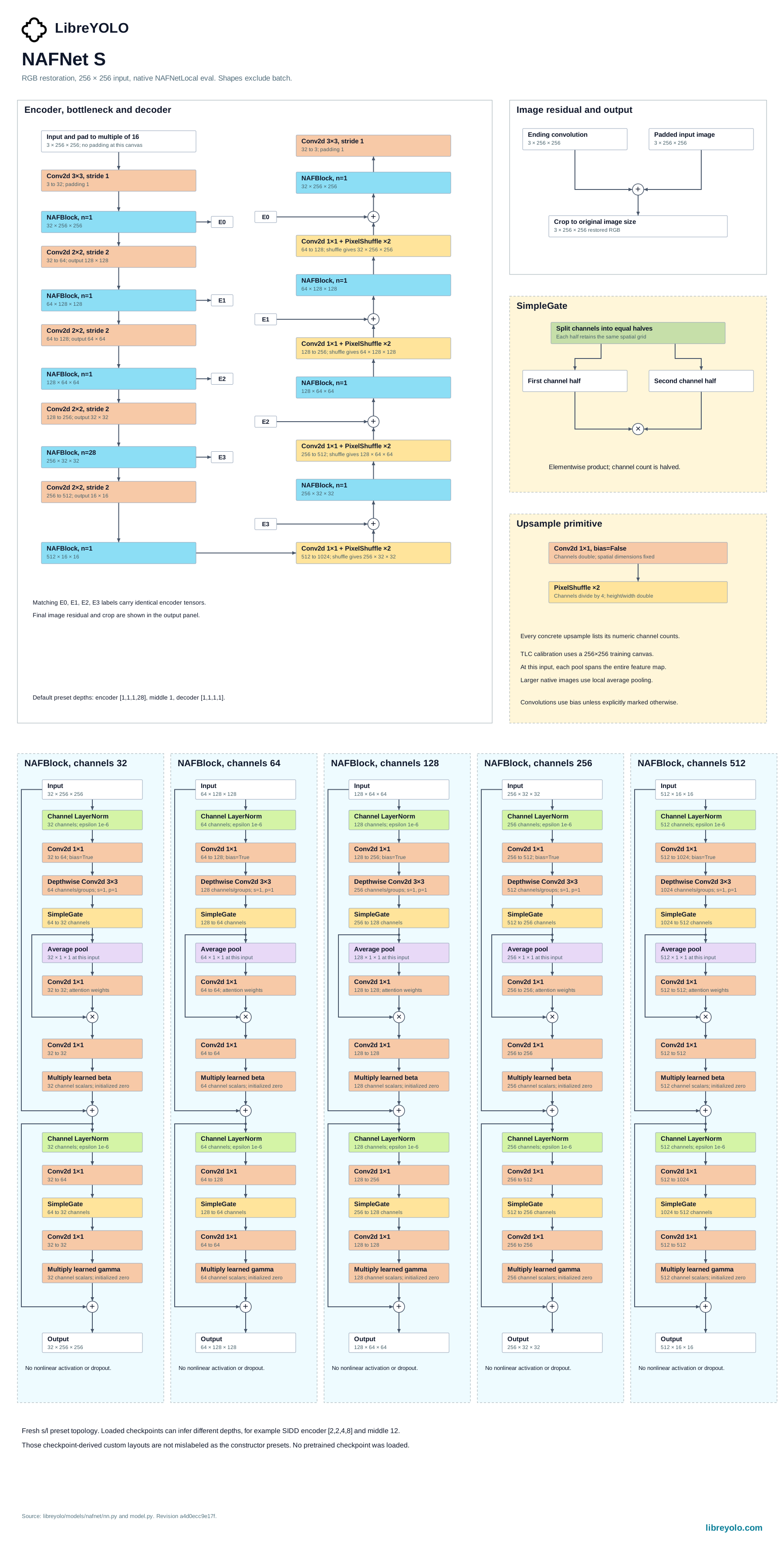
NAFNet is a convolutional network for image restoration that removes the nonlinear activation functions from a typical UNet block, replacing them with elementwise multiplication. LibreYOLO supports it for one task, restoration, with a published real-image denoising checkpoint trained on SIDD.
- Tasks
- restoration
- Sizes
- s, l at 256 px
- Install
pip install libreyolo- Support tier
- Supported, since v1.3.1. Supporting trainables: kept green in CI, features land opportunistically.
- Licenses
- Code MIT, weights MIT. Commercial use
Install
NAFNet needs no optional extra. Everything it imports is in the base install.
pip install libreyoloPredict
Weights download from Hugging Face on first use and are cached locally.
from libreyolo import LibreYOLO model = LibreYOLO("LibreNAFNetl-restore-sidd.pt")result = model("noisy.jpg", save=True) restored = result.restoredprint(restored.array.shape)libreyolo predict model=LibreNAFNetl-restore-sidd.pt source=noisy.jpg save=Truefrom libreyolo import LibreYOLO model = LibreYOLO("LibreNAFNetl-restore-sidd.pt")result = model.predict("noisy.jpg") result.restored.save("denoised.png")The returned Results object carries one field for this family, restored, a
dense HWC uint8 RGB image on the original canvas; there are no boxes to
iterate. save=True writes that restored image straight to disk rather than
drawing an annotation over the input. conf, iou and max_det are accepted
for signature parity with every other family but have no effect, since
restoration produces no detections to filter. See
prediction for sources, streaming and result handling.
Variants
Two widths share this architecture: s (width 32) and l (width 64), both
built around a 256 px training patch. Predict and validate run at native image
resolution regardless of size, padding only to the network's downsample
factor. Only the l width is currently published, as a real-image denoising
checkpoint trained on SIDD.
Train
NAFNet fine-tunes on your own paired degraded/clean images: a dataset YAML
pointing at an inputs/<split>/ folder of degraded images and a
targets/<split>/ folder of clean targets, matched by filename stem.
degradation and dataset are optional strings recorded on the saved
checkpoint for provenance; they take no part in training.
from libreyolo import LibreYOLO model = LibreYOLO("LibreNAFNetl-restore-sidd.pt")model.train(data="my-dataset.yaml", epochs=100, imgsz=256, batch=16, lr0=1e-3)libreyolo train model=LibreNAFNetl-restore-sidd.pt data=my-dataset.yaml \ epochs=100 imgsz=256 batch=16 lr0=1e-3from libreyolo import LibreYOLO # degradation and dataset are recorded on the saved checkpoint; they# don't change what is trained.model = LibreYOLO("LibreNAFNetl-restore-sidd.pt")model.train( data="my-dataset.yaml", epochs=100, degradation="denoise", dataset="MyDataset",)libreyolo train model=LibreNAFNetl-restore-sidd.pt data=my-dataset.yaml \ epochs=100 device=0,1 batch=32Left alone, the trainer runs 100 epochs with AdamW at lr0=1e-3, a batch of
16, 256 px crops, and early stopping after 50 epochs without PSNR improvement.
There is no LoRA path for this family: lora=True raises an error rather than
running, since NAFNetTrainer never opts in to adapter fine-tuning.
During training the network runs with plain global-average pooling. NAFNet's inference-only windowed local pooling (Test-time Local Converter) is detached before the first epoch and reattached once training finishes, since backpropagating through a fixed-window local pool would not match how the checkpoint is used at inference.
See training for datasets, augmentation, multi-GPU and loggers.
Validate
val() returns a dictionary with metrics/PSNR and metrics/SSIM, computed
in RGB over the full valid canvas: SSIM uses an 11x11 Gaussian window with
sigma 1.5, and fitness for best-checkpoint selection is the PSNR value.
data points at the same paired-image dataset format used for training.
from libreyolo import LibreYOLO model = LibreYOLO("LibreNAFNetl-restore-sidd.pt") # val() returns a plain dict, not an objectmetrics = model.val(data="my-dataset.yaml") print(metrics["metrics/PSNR"])print(metrics["metrics/SSIM"])libreyolo val model=LibreNAFNetl-restore-sidd.pt data=my-dataset.yamlExport
| Task | ONNX | TorchScript | ExecuTorch | TensorRT | OpenVINO | Paddle | MNN | RKNN | ncnn | TFLite | CoreML | Core AI |
|---|---|---|---|---|---|---|---|---|---|---|---|---|
| Restoration | Restoration to ONNX: supported | Restoration to TorchScript: supported | Restoration to ExecuTorch: supported | Restoration to TensorRT: supported | Restoration to OpenVINO: supported | Restoration to Paddle: not supported | Restoration to MNN: not supported | Restoration to RKNN: not supported | Restoration to ncnn: supported | Restoration to TFLite: not supported | Restoration to CoreML: not supported | Restoration to Core AI: supported |
An exported artifact loads back through LibreYOLO() on its file suffix, so a
.onnx or .engine file behaves like a checkpoint and returns the same
Results, with restored carrying the output image. NAFNet exports at a
fixed spatial resolution: imgsz must be divisible by the network's
downsample factor (16 for both architecture widths), and only the batch dimension
is dynamic when dynamic=True; height and width are fixed at export time.
from libreyolo import LibreYOLO model = LibreYOLO("LibreNAFNetl-restore-sidd.pt")model.export(format="onnx", imgsz=256)model.export(format="tensorrt", imgsz=256, half=True)libreyolo export model=LibreNAFNetl-restore-sidd.pt format=onnx imgsz=256libreyolo export model=LibreNAFNetl-restore-sidd.pt format=tensorrt imgsz=256 half=Truefrom libreyolo import LibreYOLO # The factory routes on the file suffix, so an exported artifact loads# like any checkpoint and returns the same Results object.model = LibreYOLO("LibreNAFNetl-restore-sidd.onnx")result = model("noisy.jpg") result.restored.save("denoised.png")Checkpoints
Every published weight file for this family.
| File | Weights license |
|---|---|
| Restoration | |
| LibreNAFNetl-restore-sidd.pt | mit |
Every file above exists in the LibreYOLO org today and downloads on first use.
Licensing
Check the license on the Hugging Face repository of the specific weights you download. Every checkpoint in the LibreYOLO org carries one, and they are not always the same across a family. That repository is the authoritative source; the summary below describes what applied when this page was last verified.
This is a description of the licenses involved, not legal advice. If the answer matters commercially, read the licenses yourself and take your own counsel.
- Original work
- NAFNet, Megvii
- Upstream license
- MIT
- Upstream source
- github.com/megvii-research/NAFNet
- LibreYOLO code
- MIT
- Weights
- MIT, republished at huggingface.co/LibreYOLO
- Interpretation
- MIT is a permissive license, so these weights can be used in commercial and closed-source products. It asks you to keep the copyright notice and license text with any copy you redistribute, and places no other obligation on your own application code. Part of the training pipeline is ported from BasicSR under Apache-2.0, which additionally grants a patent license. The published checkpoint is trained on the Smartphone Image Denoising Dataset (SIDD), itself MIT-licensed.
Citation
@article{chen2022simple,
  title={Simple Baselines for Image Restoration},
  author={Chen, Liangyu and Chu, Xiaojie and Zhang, Xiangyu and Sun, Jian},
  journal={arXiv preprint arXiv:2204.04676},
  year={2022}
}
Copied from the authors' citation block at github.com/megvii-research/NAFNet#citations.